
Integration Activity Log
Monitor syncing activity and integration events
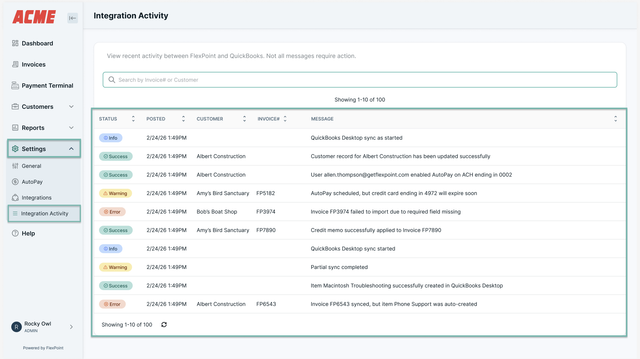
The Integration Activity Log is a powerful reference tool that shows you syncing activity and integration events across your system. Think of it as a window into what’s happening behind the scenes.
While you can’t make changes or fix issues directly from the log, it helps you monitor system performance and spot any potential integration problems early.
Try it yourself
Follow a step-by-step walkthrough on how to locate and understand your Integration Activity Log.
🚀 Start interactive walkthroughOpens in a new tab so you can follow along step-by-step.
What You’ll See in the Activity Log
The Integration Activity Log records important syncing and integration events, including:
- Invoice imports – When invoices are not imported into the system.
- Deposit synchronization – When a deposit cannot be synchronized.
- Product catalog updates – When a product is created in your catalog.
- AutoPay authorizations – When a user authorizes AutoPay.
Why the Integration Activity Log Matters
If an issue occurs during an integration or sync, it will appear in the Integration Log. This allows you to:
- Confirm that integrations are working as expected.
- Identify potential issues quickly.
- Share details with support if assistance is needed.
Best Practices
- Check the log regularly to stay up to date.
- Use it as a reference for syncing health.
- Review errors to understand what needs attention.
Comments
0 comments
Please sign in to leave a comment.